

The Anatomy of a Perfect 100 Lighthouse Score
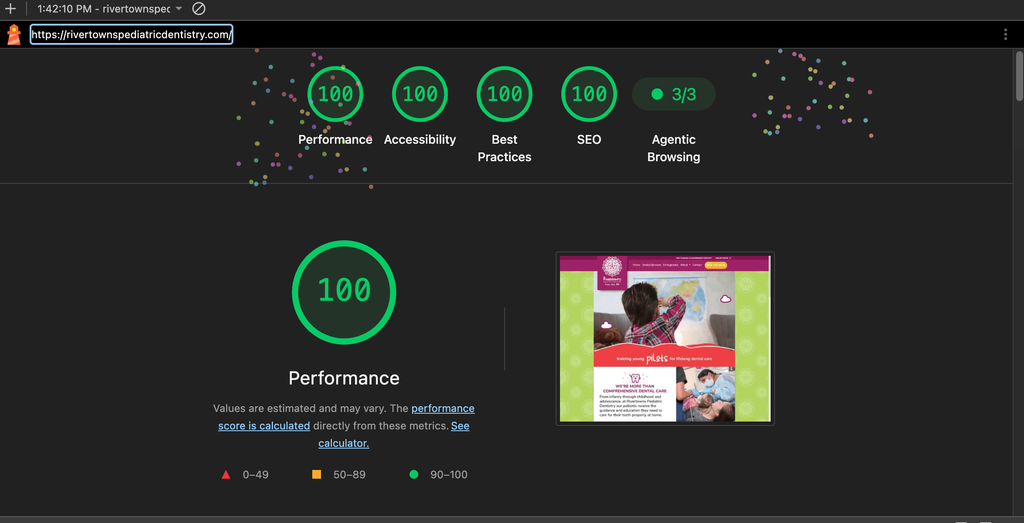
Achieving a perfect 100/100/100/100 across Performance, Accessibility, Best Practices, and SEO on Google Lighthouse occurs on fewer than 1% of homepages globally. With just 4 hours of focused updates, I achieved a flawless score on a pediatric dentistry site I originally designed and developed in Statamic 6 years ago. Feels good!
To get this legacy codebase running at peak efficiency, I focused on:
Image & LCP Optimization
Unoptimized graphics are the #1 killer of mobile speed. I removed loading="lazy" from above-the-fold hero elements, compressed heavier graphics, explicitly declared image dimensions to kill layout jumps, and added <link rel="preload" fetchpriority="high"> in the <head> for the hero video poster JPEG to cut Largest Contentful Paint (LCP) down to sub-second speeds.
I find https://tinyjpg.com/ or https://compressor.io/ really helpful for taking entire folders and optimizing (outside of on server image optimizers).
Core Web Vitals
Completely eliminated Cumulative Layout Shift (CLS) across mobile viewports by assigning explicit aspect-ratio containers.
AI & Agentic Web Readiness (3/3 Agentic Score): Resolved an automated timeout audit by serving a clean, lightweight llms.txt file. This guarantees AI web crawlers and search agents (like ChatGPT, Perplexity, and Claude) can index the practice’s services instantly without getting blocked or timed out.
Console Hygiene & Preload Audit: Located and removed an orphaned, unused <link rel="preload"> reference for bootup.css that was throwing hidden browser warnings and wasting mobile network bandwidth on initial paint. Added preload to the video poster image wrapped in an if homepage tag, so the preload only happens on the homepage.
Font-Display Swap Strategy: Optimized Google Fonts loading rules to eliminate font-swap warnings and the unpleasant visual flash of unstyled text (FOUT) when the homepage loads on slower mobile connections.
Accessibility (100%)
Fixed non-discernible icon link labels, resolved WAI-ARIA slider violations by converting generic <div> containers into role="group" slide elements, and cleared both the IBM Equal Access Checker and Google’s axe-core engine with zero errors.
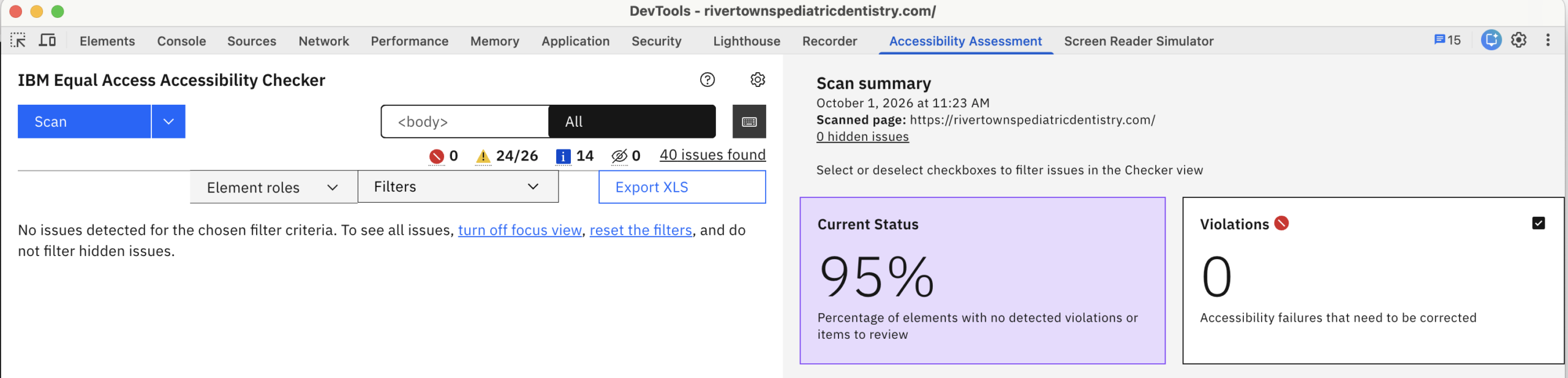
For Accessibility, here are some of the code updates. For instance, specifically with the slider, updating the slick slider code to include role: group, aria-roledescription, and aria-labelledby meets the 508 requirements.
// 2. Assign valid ARIA role + aria-labelledby to each slide
  $slider.find('.slick-slide').each(function (index) {
    var $slide =$(this);
    var $heading =$slide.find('h3');

    if ($heading.length) {
      var headingId = 'review-title-' + index;
      $heading.attr('id', headingId);
      $slide.attr({
        'role': 'group',
        'aria-roledescription': 'slide',
        'aria-labelledby': headingId
      });
    }
  });
A Note on Testing Conditions: These metrics were captured using Chrome DevTools Lighthouse on desktop against the live production server. While field data and mobile PageSpeed Insights scores naturally fluctuate due to server location, device throttling, and network latency, engineering your codebase to a 100% lab baseline guarantees that your DOM, asset pipeline, and critical rendering path are lightweight.
Code-First Compliance vs. Overlay Widgets
True web accessibility relies on a strict technical hierarchy: Fix the codebase first, add the widget second.
According to WebAIM’s annual accessibility study, over 95% of homepages fail basic WCAG guidelines due to low contrast, missing alt text, and unlabelled controls. Screen readers parse raw HTML structure, not overlay scripts. If your heading hierarchy is broken or interactive buttons lack aria-label attributes, overlays will not make the site accessible.
Once your underlying DOM passes validation with no errors, a third-party widget becomes what it was meant to be—an extra utility that offers visitors custom contrast toggles and font-scaling options.
Building with an end-to-end full-stack mindset means accessibility and SEO are never afterthoughts; instead, they are engineered into the DOM from line one.
SEO Consulting by Kelly Barkhurst
If your business or client site is facing performance bottlenecks or needs a comprehensive technical SEO and ADA audit, reach out today for a consultation. Just looking for a widget? I recommend the Accessibe widget (affiliate link).


