

If you read my previous post on our Squarespace SEO Hack: Automating and Nesting FAQ Schema with JavaScript, you know I love a good technical workaround. In that article, we looked at how to use vanilla JavaScript to scrape standard Squarespace accordion blocks and dynamically nest that data in your schema files. On Squarespace, it’s a relatively smooth process because the semantic DOM layout is highly static and predictable.
But when I recently tried to replicate that same automated workflow on a premium site built in Wix Studio (optimizing the luxury Stone Hill Inn in Stowe, Vermont), I ran into an entirely different beast.
Wix didn’t just sandbox the data; its entire compilation engine actively hid it. Standard DOM queries failed, Velo API calls crashed, and even traditional class-scraping loops came up empty.
If you are transitioning from designer to full-stack dev, this is the ultimate case study on why platform architecture dictates your code…and how I cracked Wix’s sandbox with a publication-proof backdoor strategy.
Why the Squarespace FAQ Schema Logic Failed on Wix
On Squarespace, a selector class path is stable. If an accordion text box uses a class container today, it will almost certainly use that same class name tomorrow. You can target it confidently with a basic script.
Wix Studio completely flips that script because it runs on a modern React-based architecture under the hood. When you view the raw HTML source of a Wix site, you’re looking at a static snapshot. The moment the page hydrates in the user’s browser, React takes control of the layout tree, mounts a virtual DOM, and updates element properties.
Take a look at a snippet of the raw markup generated by the Wix Marketplace FAQ widget app on our page:
<div class="sCf1ZHF o__9whR2P---size-5-small sbw2X_G">
    <button class="sQyJbM5">
        <h3 class="slfXSxB" data-hook="title">Why is booking direct best?</h3>
    </button>
    <div class="_4lcfU" data-id="content-viewer">
        <p>Simple. When you book directly through our website...</p>
    </div>
</div>
Look at those class string tokens: .sCf1ZHF, .slfXSxB, ._4lcfU.
Those are compiled React build hashes. They are randomized, generated dynamically at build time, and highly temporary. If we had built a standard element scraper targeting those text-string classes, the entire schema pipeline would have silently broken during the client’s very next dashboard publish pass.
The Hit List: What Didn’t Work and Why
Before arriving at the bulletproof solution, I exhaustively tested the standard developer paths within the platform editor framework. Here is why the normal tools came up short:
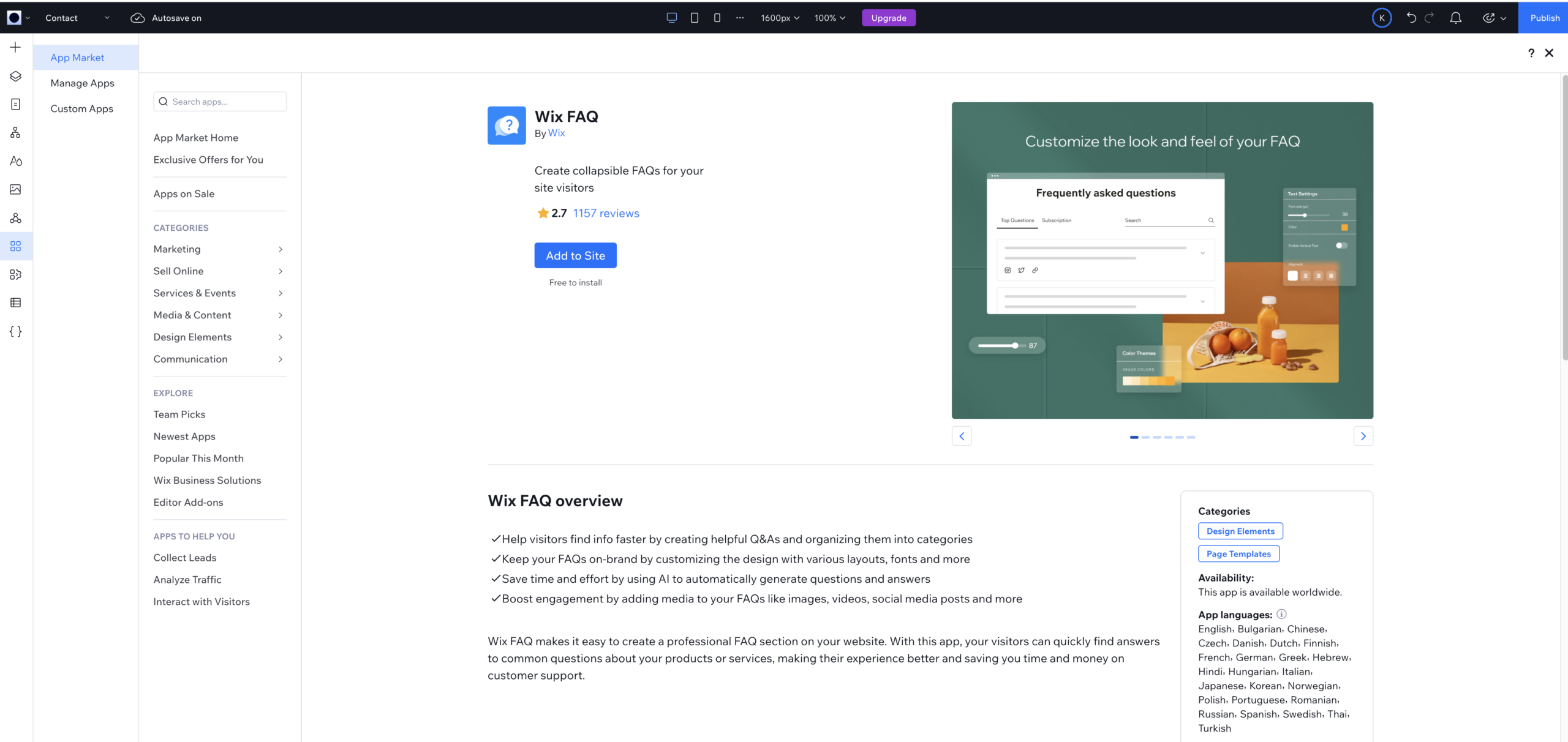
1. The Native Velo Component API ($w)
The Code: $w("#faqWidget1").items or .onItemRendered()
The Fail: Wix marketplace widgets are completely enclosed application blocks. To the native page code panel environment, #faqWidget1 it doesn’t register as a standard grid repeater or collection table; it’s a closed layout canvas wrapper. Trying to call standard loops threw an immediate fatal TypeError: ... is not a function, stalling the thread.
2. The Cloud Database Collection Query
Enabling Wix CMS App Data Streams (and the Missing FAQ Table)
The Attempt: In Wix Studio, you can toggle on optional system data streams to expose backend app collections directly to Velo and code querying. We enabled these App Collections in the CMS, unlocking raw database collections across almost every site app—including Blog (Posts, Categories, Tags), Stores (Products, Variants, Orders), Locations, Coupons, and even PrivateMembersData.
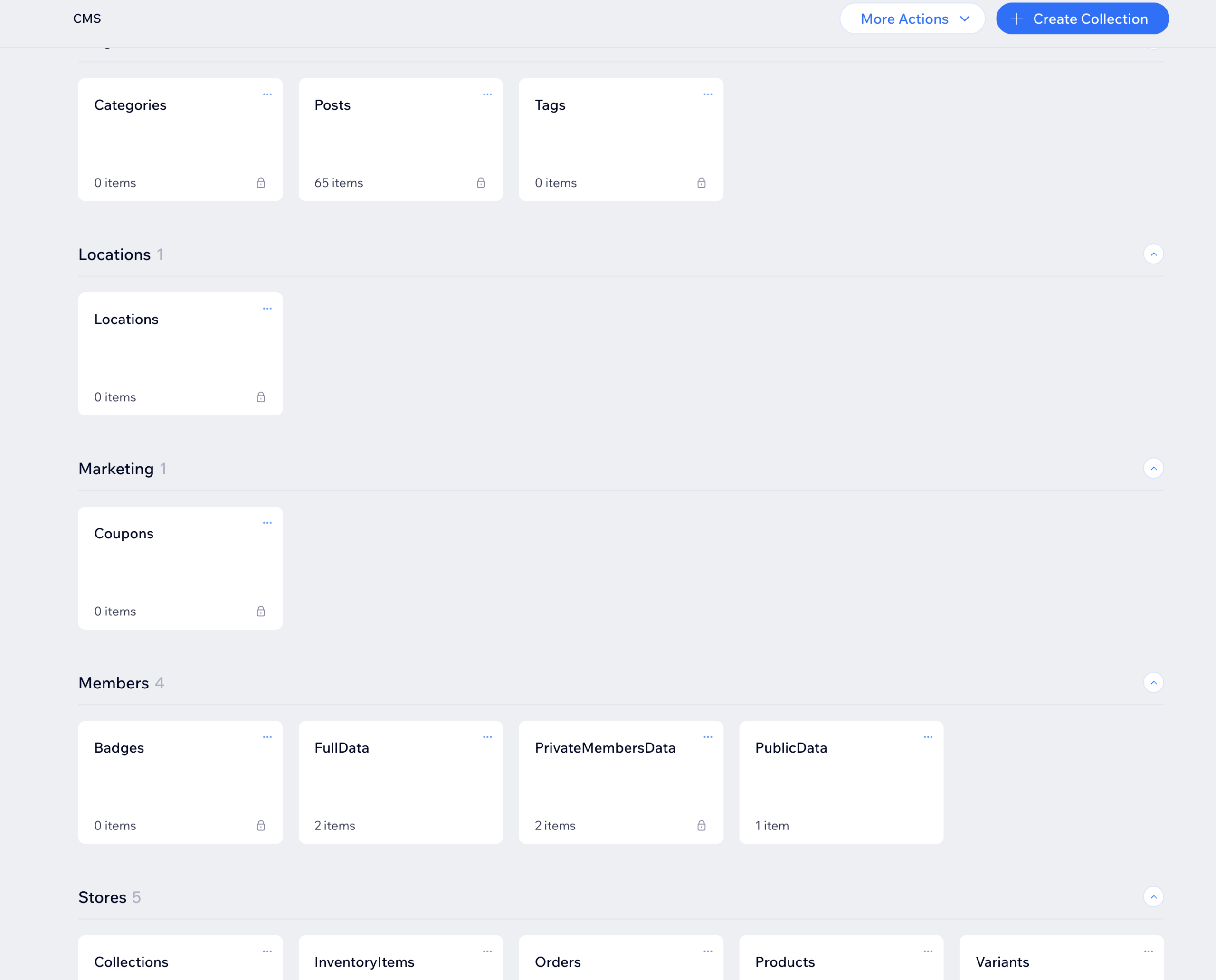
The Code: wixData.query("WixFAQ/FAQs").find()
The Fail: Noticeably missing from these exposed streams? The FAQ app.
Unlike Wix Blog or Wix Stores, the native Wix FAQ app stores its entries in an isolated, proprietary app layer rather than publishing it as a native CMS collection table. Attempting to query wixData.query("WixFAQ/FAQs") threw an immediate WDE0025: Collection does not exist error. Even though the CMS exposes data across other native apps, FAQs are completely walled off.
3. The React Suspense Race Condition
The Code: A standard timer loop that waits for elements to appear.
The Fail: Because the app element bundle uses dynamic multi-layered rendering dependencies (FaqOoiViewerWidgetNoCss.bundle.min.js), React places it behind a Suspense Fallback state during page load. Brittle setTimeout functions fired too early, looking at a section container that hadn’t finished painting its contents yet.
4. The wix-faq-backend SDK & Asynchronous Latency
The Attempt: Why not just import the official wix-faq-backend SDK module to pull the questions directly via backend code?
The Fail: While wix-faq-backend allows you to read FAQ data programmatically on the server side, fetching data asynchronously inside $w.onReady() creates rendering latency. Googlebot renders HTML fast; if a backend promise takes too long to resolve before appending script elements, search crawlers often index the page before the JSON-LD schema is injected. Furthermore, backend SDKs don’t automatically inject structured <script type="application/ld+json"> tags into the live document <head>.
Ultimately, letting React hydrate the native widget on the front end and then using a client-side MutationObserver to scrape the rendered text proved to be faster, more reliable, and guaranteed that Googlebot captured the injected schema.
The Solution: HTML Injection and Immutable Attributes
I decided to bypass Wix’s dynamic Velo sandboxes and unstable React class hashes. So, instead of writing code inside the standard page code manager panels, I moved the script entirely to the Wix Dashboard Custom Code Injection Panel. This forces the execution script to run with global, native browser privileges right inside the live HTML <body>.
To make the scraper completely permanent and publish-proof, I dropped all variable class strings. Instead, the code locks onto a custom wrapper section added in the editor (.section-faq) and uses a MutationObserver to watch for the exact microsecond React finishes its hydration passes.
Once ready, it targets immutable, platform-wide semantic attributes ([data-hook="title"] and [data-id="content-viewer"]). This is a safe route, because Wix hardcodes these exact descriptive strings into their baseline rendering engine specifically to support global accessibility standards (ARIA) and search crawl indexing. They cannot change them without breaking their own infrastructure.
The Production-Ready Code
Here is the exact automated script now running on the live system. It runs with zero platform dependencies and updates dynamically whenever the client updates an entry. You do need to add the class .section-faq to the section that holds or wraps your Wix FAQ app component.
<script>
(function() {
    function buildDynamicFaqSchema() {
        // 1. Target your stable custom structural container class anchor
        var targetSection = document.querySelector('.section-faq');
        if (!targetSection) return;

        // 2. Select all question headers using the unchangeable framework data-hook
        var questionNodes = targetSection.querySelectorAll('[data-hook="title"]');
        if (questionNodes.length === 0) return;

        var schemaArray = [];

        questionNodes.forEach(function(qNode) {
            var qText = qNode.innerText || qNode.textContent;

            // 3. Natively cross-reference the answer block safely without layout class guessing
            var rowItemContainer = qNode.closest('[data-hook="accordion-one-column-wrapper"]') || qNode.closest('[role="region"]') || qNode.parentElement.closest('div');
            if (!rowItemContainer) return;

            // Target the answer block inside this specific row using its native platform data identifier
            var aNode = rowItemContainer.querySelector('[data-id="content-viewer"]') || rowItemContainer.querySelector('[data-hook="accordion-item-content"]');
            if (!aNode) return;

            var aText = aNode.innerText || aNode.textContent;

            if (qText && aText && qText.trim().length > 3 && aText.trim().length > 10) {
                var cleanQ = qText.trim();

                // Prevent duplicate records from trailing into the final metadata arrays
                if (!schemaArray.some(function(i) { return i.name === cleanQ; })) {
                    schemaArray.push({
                        "@type": "Question",
                        "name": cleanQ,
                        "acceptedAnswer": {
                            "@type": "Answer",
                            "text": aText.trim().replace(/\s+/g, ' ')
                        }
                    });
                }
            }
        });

        // 4. Inject finalized clean data packets directly into the head container file
        if (schemaArray.length > 0) {
            var oldScript = document.getElementById('dynamic-faq-jsonld');
            if (oldScript) oldScript.remove();

            var scriptContainer = document.createElement('script');
            scriptContainer.id = 'dynamic-faq-jsonld';
            scriptContainer.type = 'application/ld+json';
            scriptContainer.text = JSON.stringify({
                "@context": "https://schema.org",
                "@type": "FAQPage",
                "mainEntity": schemaArray
            });

            document.head.appendChild(scriptContainer);
            console.log("Success: Immutable FAQ Schema generated and appended safely to document head!");
        }
    }

    // 5. Watch for the exact frame Wix's data-attribute markers attach to the window tree
    var layoutObserver = new MutationObserver(function(mutations, observer) {
        var widgetCoreHydrated = document.querySelector('[data-id="content-viewer"]');
        if (widgetCoreHydrated) {
            buildDynamicFaqSchema();
            observer.disconnect(); // Terminate observer loop right away to maintain light performance
        }
    });

    if (document.body) {
        layoutObserver.observe(document.body, { childList: true, subtree: true });
    }

    // Safety fallback layer to process heavily cached user networks
    window.addEventListener('load', function() {
        setTimeout(buildDynamicFaqSchema, 2000);
    });
})();
</script>
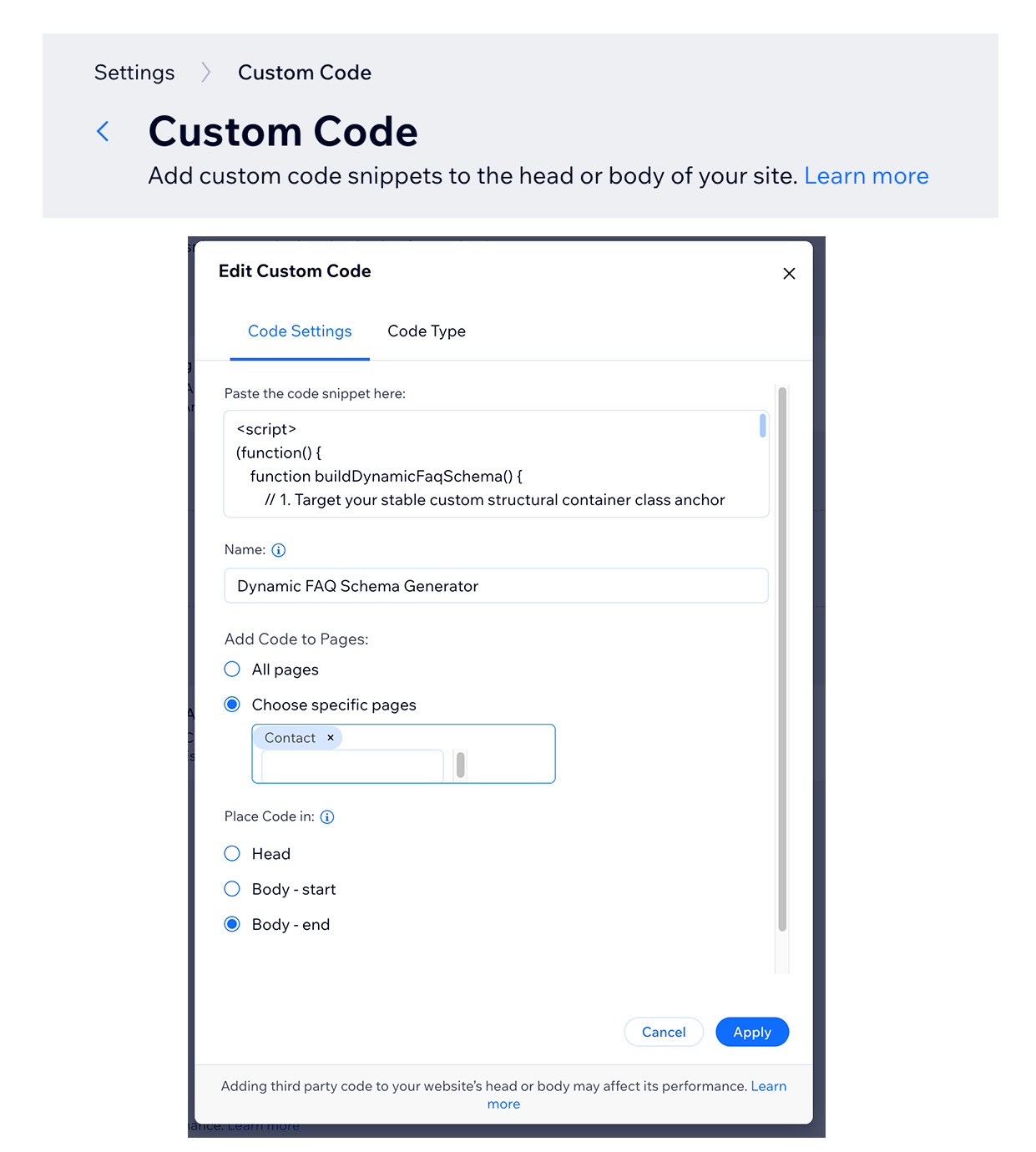
From your Wix Studio website’s dashboard, navigate to Settings > Custom Code. Here, click “Add Custom Code” to open a modal window where you can paste your script, name the script, and choose which pages and where to place the code. I named my script, Dynamic FAQ Schema Generator, and added the code to my Contact Page in the Body at the end. Click apply and test away.
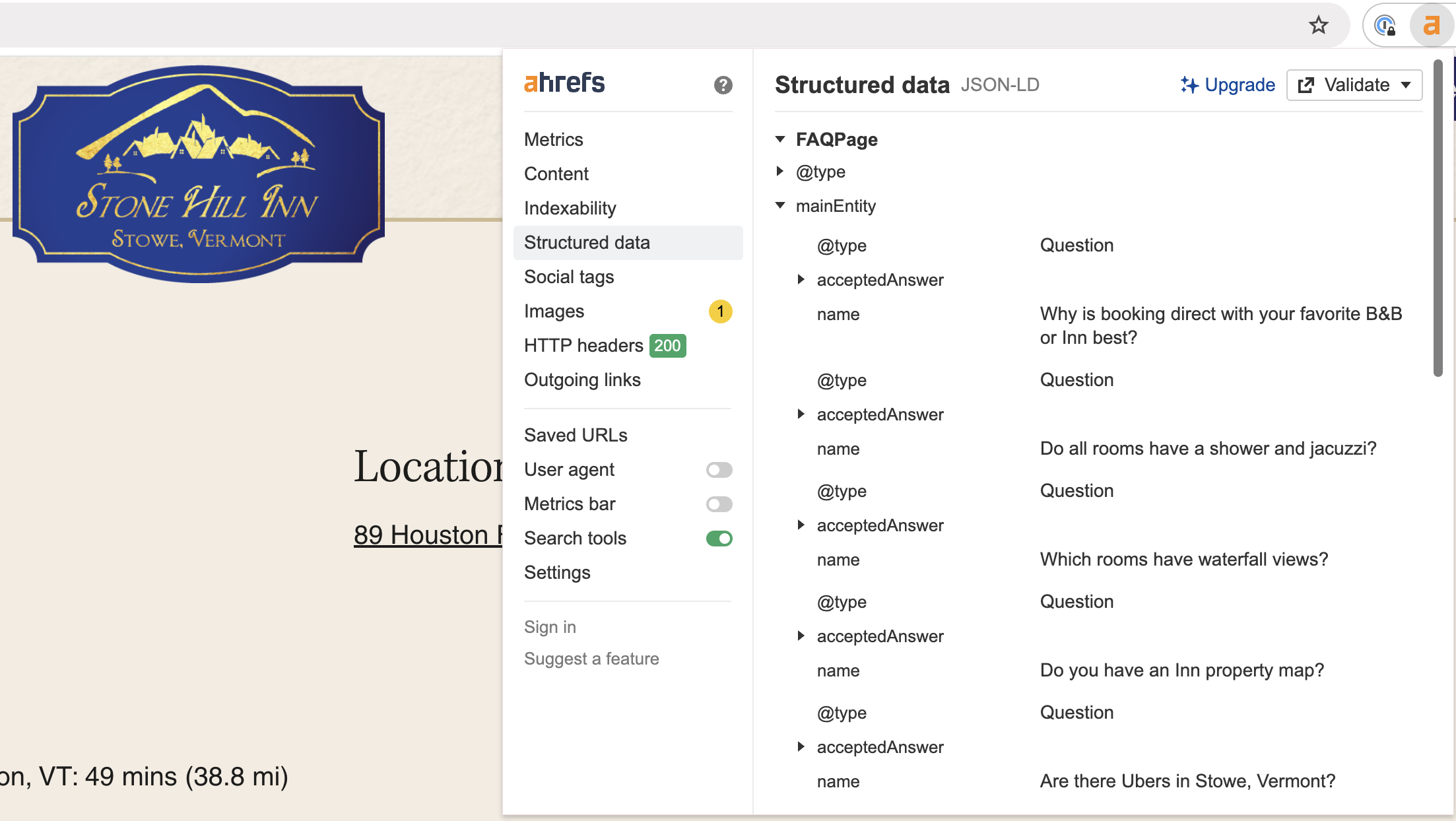
I used the ahrefs SEO Toolbar (Google Chrome Extension) to test the JSON. You can see this extension reads the FAQ page schema. Don’t forget that you can also resubmit your updated page (with Schema) in Google Search Console too.
The Takeaway for Full-Stack Designers
Moving from design to true full-stack means learning to look past temporary class-string aesthetics. A platform’s compiled visual output can shift with each deployment, but the underlying semantic tags and accessibility hooks remain permanent.
By targeting the unchangeable data attributes Wix hardcodes for ARIA compliance, we built a script that treats the app as a reliable dataset. The client retains full control over their dashboard widget, while our system dynamically updates their structured search schema on every layout view.
Have you encountered dynamic class resets or hydration blocks when automating schema in low-code app marketplaces? Let’s talk about solutions in the comments below!
Frequently Asked Questions
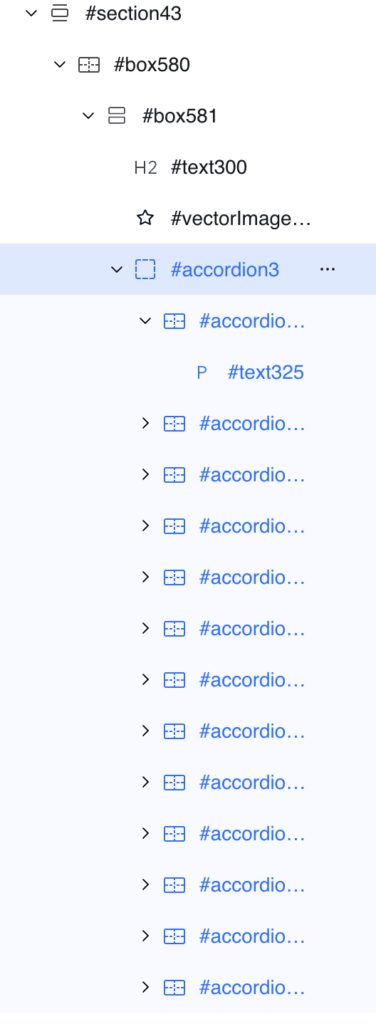
Yes, the FAQ JSON/LD schema script above can work with your FAQs configured in a standard Wix Studio accordion. For instance, you can add a class (such as .section-faq) to your accordion wrapper. Look for parent accordion layer, in this screenshot it’s #accordion3 and give it a class in Wix Studio.
Yes, the provided javascript method above can generate schema for your website FAQs in the Wix FAQ app from marketplace.


