

If you hired the GoDaddy design team to build your WordPress website, you likely walked away with a website powered by premium tools like Beaver Builder and Gravity Forms.
However, a few months or a year down the road, you might see a frustrating red notification in your WordPress dashboard:
“Update Unavailable! Please enter a valid icense key to enable automatic updates. Enter License Key. The following error was encountered: Subscription not found.”
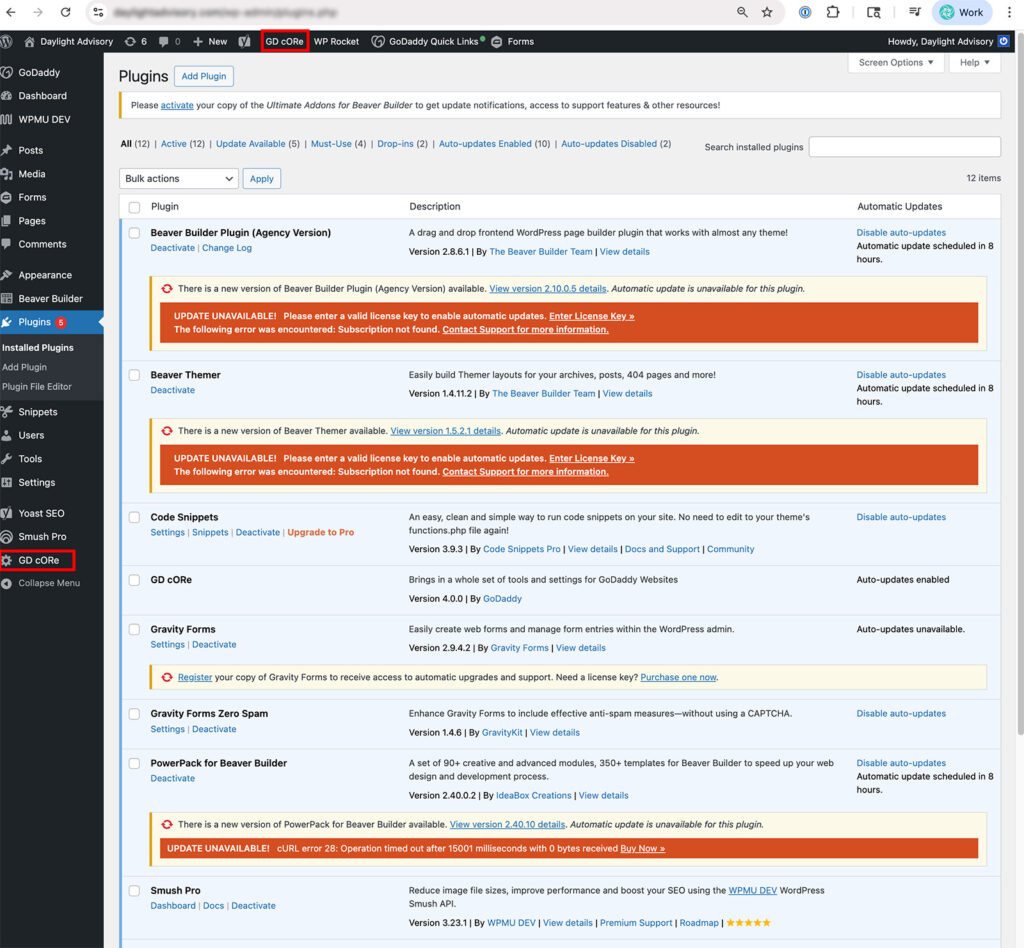
You paid GoDaddy to design the site, so why are these plugins asking for more money or license keys? If you click the links and try to contact plugin support, you often end up in a confusing loop – caught between the plugin provider and GoDaddy support.
The good news: You don’t need to buy new licenses. The secret lies in a “hidden” plugin called GD Core.
Why are my plugins asking for a license key?
When GoDaddy’s agency team builds a site, they use their agency-level licenses to install premium plugins. Because these are managed under their “Agency” umbrella, the standard WordPress “Plugins” page won’t always allow you to update them directly.
Instead of searching for a license key you don’t have, or wasting your precious time on GoDaddy support calls and texts (with endless validations!) you need to use the GoDaddy-specific portal built into your site.
The Solution: Using the GD Core Plugin
The GD Core plugin is a toolset installed by the GoDaddy design team. It acts as the “bridge” between your site and their agency licenses.
Watch Video for No License Key Needed
Step 1: Locate GD Core
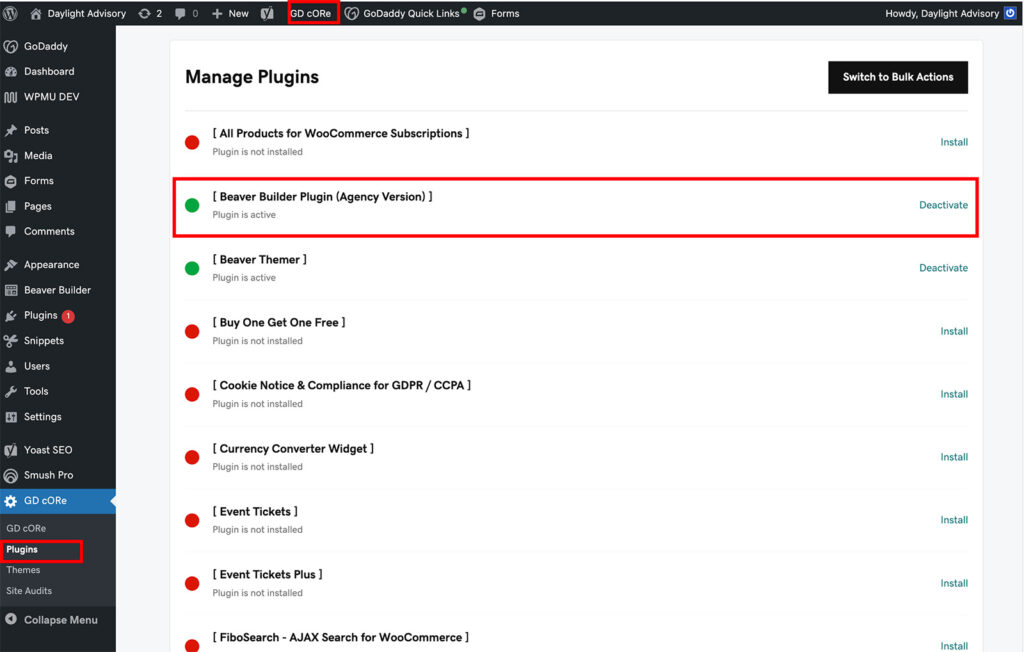
In your WordPress admin sidebar, look for a menu item labeled GD Core. You can usually find it on the left-hand menu or sometimes as a shortcut in the top admin bar.
Step 2: Access the Managed Plugins List
Click on GD Core, then navigate to the Plugins tab within that menu. This page looks different than your standard WordPress plugins list. It shows all the premium “Agency” plugins available to your site.
Step 3: Update and Activate
On this screen, you will see a list of plugins like Beaver Builder, Gravity Forms, or Ultimate Add-Ons.
- If an update is available: You will see an orange notification or an “Update” button right there.
- If it says it’s not active: You can toggle the activation or update it here without ever needing to type in a license key.
The Real Problem: Broken Sync and “Stuck” Edits
It’s easy to ignore a red notification if the site looks fine, but an outdated license causes a much bigger headache: your changes may not go live.
I discovered this when working on a client’s site. We were making updates in the Beaver Builder editor, and everything looked perfect in the preview. But the moment we hit “Publish,” the live site remained exactly the same.
Why does this happen? When the license is flagged as “invalid” or “expired,” Beaver Builder (and similar agency tools) may restrict certain functionalities. In this case, the connection between the page builder and the live database was essentially “locked.”
If you find yourself in a loop where:
- You make a change.
- You click Publish.
- The live site doesn’t update.
…Check your GD Core updates immediately. Once I updated the plugin through the easily overlooked menu I just showed you, the sync issue vanished, and the edits went live instantly.
Troubleshooting Common Issues
- The “Update Failed” Error: If you click update and it doesn’t work immediately, try refreshing the page. Sometimes the connection between the GD Core plugin and the master license server needs a moment to handshake.
- Finding Specific Plugins: If your list is long, use
Command + F(Mac) orCtrl + F(Windows) to search for the specific plugin name (like “Ultimate”) to find it quickly in the list. - New Features: One “bonus” of this method is that you might find other premium plugins available in the GD Core list that you can implement on your site for free!
Summary for Site Owners
Don’t feel pressured to buy individual licenses for tools that GoDaddy already provided. As long as you are hosted and managed under that initial setup, the GD Core menu is your “secret door” to keeping your site secure and up to date.
Did this fix your update loop? If this tip helped you, consider subscribing to Designer to Fullstack. I share regular tutorials for business owners, designers, and developers navigating the world of full-stack web design.
Happy Web Developing!
Explore more WordPress tips and troubleshooting guides.
If you’ve updated your plugins but decided that Beaver Builder is no longer the right fit for your workflow, check out my guide on how to safely remove Beaver Builder from your WordPress site without breaking your layout.

